

Remote Cache
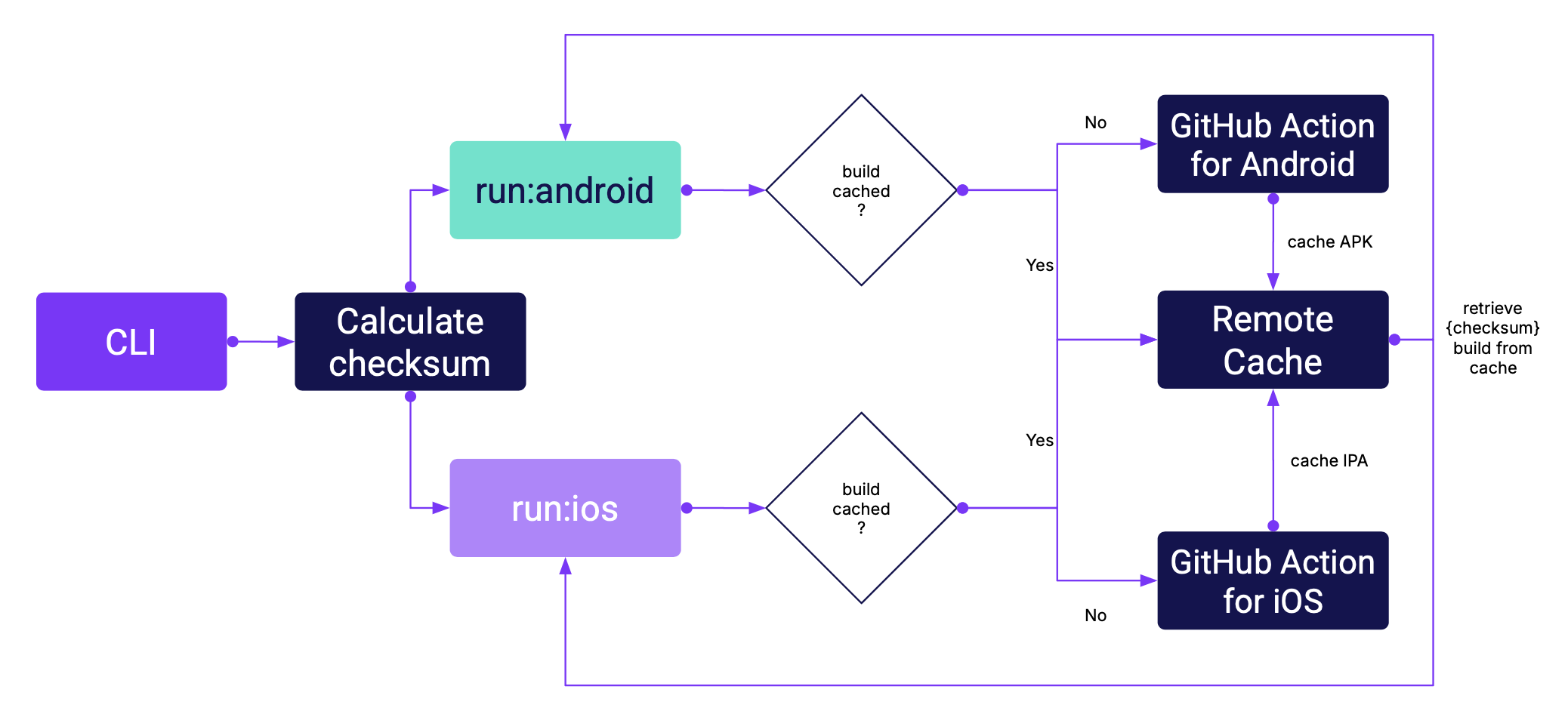
Remote Cache is a feature that speeds up your development workflow by centralizing storage for native app builds. These builds can be retrieved either manually or through our CLI, dramatically reducing build times across your team.
What is Remote Cache?
The Remote Cache acts as a centralized storage for native app builds that can be hosted on various platforms:
- GitHub Actions
- Amazon S3
- Cloudflare R2
- Custom providers
Ready-to-Use Actions
Rock ships with ready-to-use GitHub Actions:
callstackincubator/ios- iOS builds and cachingcallstackincubator/android- Android builds and caching
These actions automatically store native artifacts that can be reused across CI jobs and your local development environment through the Rock CLI.
How It Works
- For each build, we calculate a unique hash (fingerprint) that represents your project's native state
- This hash remains stable across builds unless you:
- Modify native files
- Change dependencies with native code
- Update scripts in package.json
- When you make JavaScript-only changes, the hash stays the same
- The CLI checks for matching builds in:
- Local cache (
.rock/directory) - Remote storage
- Falls back to local build if no match is found
- Local cache (